Showing posts with label Internet Marketing. Show all posts

Wednesday, November 4, 2020

Converting Leads To Customers – How To From Vancouver WA SEO

Convert leads to sales with SEO from Vancouver WA SEO services

Why Don’t My Leads Convert Into Customers?

This is a question that can really disrupt your day and your sleep. Getting people to recognize and trust your brand is time consuming and can be elusive. Business owners ask us every day about how to convert prospects (aka leads) into paying customers. So we asked the question: What do you find to be the most frequent reason for your leads not to convert?

  • A: They don’t trust your business
  • B: You are not established as a market leader
  • C: Your service is too expensive
  • D: Time is not right

How To Get Leads To Convert Into Customers

Although there are many ways to approach this question, it seems that all the possibilities listed above can be correct. However, when people are surveyed about why they buy or don’t buy from a service provider, the same word keeps cropping up, “Trust.” So what can you do to gain prospective client’s trust?

Here are some ideas to gain trust rapidly.

1. Provide a Service for Free

Choose a service you provide that will have high perceived value but low cost to you to fulfill. An example for a plumber would be to “Winterize” hose spigots for home owners. People forget about their hose spigots, then find out in the spring that their hose spigots is cracked or broken from freezing. This is a perfect opportunity for you to volunteer to winterize outdoor hose spigots to prevent damage during the winter. Advertise on Facebook or, for less money, add a post about your free service, then use Facebook Post Boost to get more people to see your post. This is one of the fastest and most effective methods for getting brand recognition and converting leads to customers.

2. Offer Incredible Service

Post on your website that you will see any customer who calls during business hours, before the end of the business day. This can be difficult at first and you may be working some extra hours, but you will really make points with new customers and get rave reviews for your “rapid service.” Those top reviews, especially Google reviews will boost your brand rapidly and pass instant trust to prospective customers.

3. Be Honest

Often we don’t want to be the person who tells someone the “bad news.” However, as a service business owner, try to cushion the bad news with positive information. “If we replace your water heater today, you will have consistent hot water for years, and your gas/electric bill will be much less. Also, you’ll save on expensive repairs from either me or another plumber.” This example gives, first the news, then the good news. Tell your prospective client up front about their options and the consequences for their choices and they will appreciate your candor and honesty.

4. Follow Up With More Free Offers, Service, and Honesty

Sometimes those leads are just plain slow to commit. Don’t give up, continue to contact them with the same types of services your offered previously. Let them know that you are still in business and ready to serve. They may have misplaced your business card, forgot your phone number, or just become to busy with daily life. Part of your job as a business owner is to keep your brand active with continuous contact.

These tips are just one of many methods you can use to get creative and help “onboard” your leads by going from cold to warm to hot, turning them from prospects to paying customers.

When you need marketing advice, expertise, and professional Internet Marketing Services, call Vancouver WA SEO at (503)828-6268. We have over 20 years experience in Internet Marketing, SEO, Google local search optimization, and Social Media Marketing strategies.

Sunday, November 1, 2020

Using Google To Boost SEO

Why Are Google Properties So Important For High Rankings?

Overview Of Local Business Marketing

Google My Business Vancouver WA SEO

Google My Business (GMB)

Google My Business is a free service from Google that allows you to set up a very basic website, upload images, and create posts. Google’s primary purpose is to help businesses improve their brand recognition. However, the real power of GMB comes from Google’s “local Maps listings.” Google will display the top 3 local businesses for a search at the top of the search results page. The page that displays after a search on Google is called a Search Engine Results Page, more commonly known as a SERP.

The Google local maps search is also called the “3 Pack” and, more recently, “the holy grail” of search listings. Being in the Google 3 pack is the target for every local search engine marketing campaign. Google has stated that their newest algorithms attempt to locate listings that are geographically close to the searcher for business services, like plumbers and HVAC companies and businesses with locations, such as restaurants.

What Does Google Want In A Web Page?

Google judges each web page based on Authority, Relevance, and Trust, aka “ART.” If Google considers a web page to have high authority, relevance, and trust, it will be positioned in a high ranking spot in the Google SERPs.

How Do GMB Posts And Images Help Promote A Business?

Here’s a link to a GMB Post For Gravity Fitness And Tennis located in Hailey, Idaho.

Creating many GMB posts is very helpful for improving visibility, branding, and trust with Google. Adding geo-optimized images to a GMB account will also elevate the business credibility with Google.

What Should I Place In My GMB Posts?

GMB Posts are mini ads that you can use to inform prospective customers about your service, your business, specials, and events. Basically you can put anything into a GMB Post. To be effective a GMB Post should include the service or product name, which represents “key words”, a description and why this is interesting. It should also include an image that is relevant to the topic of the Post. Finally, and this is often overlooked, insert links to the page on your website that discusses the “key words”. Finally, place links to other important business properties, like your GMB website, Google Sites, Google Maps, and Google Drive.

Google limits the size of a GMB Post to 1500 characters. You can place a great deal of Authority, Trust, and Relevance into just one post by laser targeting the topic, then adding interesting content.

How Can I Leverage Google Posts?

Share your GMB Posts on Facebook and Twitter to get maximum power from your GMB post. This creates a link back to your GMB Post, which improves the power of any links included within the post.

What Is Social Media and Why Is It Important?

Social media are interactive computer-mediated technologies that facilitate the creation or sharing of information, ideas, interests, and other forms of expression via virtual communities and networks. Google My Business is not considered a Social Media entity since is is 100% business oriented and does not include sharing of ideas. YouTube, another Google owned property, is considered a Social Media entity. Other major Social Media outlets are Facebook, Twitter, LindedIn, Instagram, Pinterest, Reddit, Quora. To improve visibility and positioning in the local search listings, a business should utilize YouTube videos, Facebook, and Twitter to maximize visibility. Other Social Media can be helpful, but the big three bring the best results for local businesses.

Social Media can be beneficial for online marketing in two ways. It can increase user interaction and, in some cases, direct sales or inquiries for a business. Social Media also helps by providing very powerful links back to a business’ web pages. These links are helpful in improving a business online authority, trust and relevance – and ultimately moving the business’ web pages up in the Google SERPs. Once again, leveraging GMB via Social Media is a very powerful tool.

How Can Using Other Google Properties Help?

Leveraging other Google properties also improves the business’ trust and authority with Google. Those properties include Google Sites, Google Drive, Google Sheets, Google Docs, Google PDFs, Google SlideShare, and Google Images. Knowing how to use these properties correctly will greatly improve a business’ online presence.

How do Web 2.0 sites help a business site? Web 2.0 sites are websites that allow anyone to create and share online information or material they have created. For promoting a business online, Web 2.0 sites are an excellent place to enter content relevant to the business along with links to the business’ web pages. Prominent Web 2.0 sites are WordPress.com, Blogger, Tumblr, Gravatar, Bitly, OneNote, and Medium. Using Web 2.0 properties wisely can improve linking, trust, relevance and authority; all these contribute to elevating web pages in Google listings. The Web 2.0 sites that have highest value to a business are ones where you can create your own account within the larger Web 2.0, then enter your content and linking.

What Are Online Assets?

Any web page that a business can control is considered an asset. Here’s a brief list of web entities that can be used as online business assets:

  • Business Website
  • Google My Business (GMB) Account
  • Google My Business (GMB) Website
  • Facebook Account
  • Twitter Account
  • Linkedin Account
  • Pinterest Account
  • Instagram Account
  • GMB Posts
  • GMB Images
  • Google Business Reviews
  • Google Classic Sites
  • Google New Sites
  • Google Drive
  • Google Sheets
  • Google Docs
  • Google PDFs
  • Google SlideShare
  • Google Images
  • Google Map
  • Google My Maps
  • Business Location Site
  • WordPress
  • Blogger
  • Tumblr
  • Gravatar
  • Bitly
  • OneNote
  • Medium
  • Instapaper
  • AboutMe
  • How Do I Use Assets To Maximize Linking?

    Where should I “point” my links? If you control a number of web assets of high authority, send links directly to web pages you want to promote. Another strategy that creates what we call “safe links” is to create several Google assets that link to your web pages. To boost the link power, send links to those Google assets that you create. Why? Google gives itself and its properties the highest authority and they trust links from those properties. A link from a Google New Sites has much more authority than a link from an obscure website.

    Summary – Why GMB Is Critical To Business Online Marketing

    Google My Business is a major factor in a business’ online success. Ignoring any aspect of GMB can be costly. Statistics show that the top 3 listings in the Google 3 Pack receive a huge percentage of clicks for a given search. According to Advanced Web Ranking, the world’s longest standard rank tracking tool, the third, second, and first results receive 9.5 percent, 13.81 percent, and 24.81 percent of clicks respectively, for a combined total of 47.79 percent of clicks. In terms of market share, the Google 3 Pack is now the most important online target for a business.

    For more information about us, go to the SEO Vancouver Washington web page.

Friday, October 30, 2020

Turbo Instant Reply

Instant Reply With Turbo Button on Menu

Turbo On Menu


Instant Reply With NO Turbo Button on Menu

No Turbo On Menu

Thursday, October 15, 2020

Google Mobile Friendly Test Results

The Google Mobile Friendly Test

What Do The Mobile Friendly Test Results Mean?

Failing The Mobile Friendly Test Will Kill Your Web Traffic

If your website fails the Google Mobile Friendly test, is simply means your site does not look good on mobile devices, like smartphones. Google is now elevating sites that pass the mobile friendly test to higher position in the search engine results pages (SERPs). This means a site that is not mobile friendly will drop down in the listings. Additionally, Google AdWords will evaluate your site when you start a pay per click campaign. If your landing pages (target pages) are not mobile friendly, your web pages will be marked down in the page quality score. As a result, your AdWords will not be very effective.

Has your site failed the Google Mobile Friendly test? Contact us to schedule an appointment to discuss your website issues. We specialize in upgrading old, broken, and non Google compliant websites.

The issue of mobile friendliness and the user experience for websites on mobile devices is not only serious, it can be difficult to fix. With the increase in smartphone models, it becomes even more important to ensure your website passes the Google Mobile Friendly test. You can find out more about Mobile First here.

Your website must function properly on the enormous variety of smartphones that now exist. OpenSignal identified a very large number of 24K+ unique Android models accessing its site in 2015, but your site does not need to target all of those. Your site should look good on the top selling devices, however, because these are the mobile phones your potential customers will use. Concentrate on user experience when designing and developing your web pages for a number of devices to reduce bugs and web page issues across your entire web site. Any problems that do occur can greatly reduce web page conversion rates.

Vancouver WA SEO will help your site pass the Google Mobile Friendly

This is an image of the original Google Mobile Friendly test from 2015. It was very basic, however, it would let you know if your site passed or failed the test. It did provide information about why the website failed the test. It would inform you if the text was too small to read, if the viewport was not set, and if the content was wider than the screen.

The Google Mobile Friendly test is constantly evolving. This format has now been updated, with Google adding more information for users. The image from 2015 is no longer valid. Look at the image below to view the current Google Mobile Friendly test. Notice that it has a very simple interface, but does have links to other helpful resources.

Vancouver WA SEO will make certain your site passes the Google mobile friendly test

The latest edition of the Google Mobile Friendly test has more features and gives more tips on why your website failed the test and what you can do to improve your website. Website theme and template developers are now creating only mobile friendly websites. If you are in the market to purchase a website WordPress theme, make certain it is “responsive” before you purchase the theme. Retrofitting a WordPress theme to make it mobile friendly, also known as mobile responsive, is a total waste of time. If your site is not responsive, return to the vendor site where you purchased your theme to see if it has been updated to responsive. Updating an existing theme with a new version is not a difficult process and this is the safest technique for upgrading.

UPDATE FOR 2019!

Google Mobile Page Speed Test Update 2019

Google reconstructed the site speed testing tool that first launched in 2016. “Test My Site” (which really can be used to test any site without the user being the verified owner) now features more details on a site’s mobile site speed.

The Google testing tool will provide information about:

  • The potential impact of site speed on revenue and a detailed list of recommended fixes to increase speed on up to 5 pages on the site.
  • The speed of both the entire site and of individual pages and whether the site or page speed is faster or slower compared to the prior month.
  • A Fast, Average or Slow score for site speed or page speed and a benchmark report against competitor sites.
  • A complete report that you can download.


Google Mobile Friendly Test failure requires a major upgrade for your website.

Here’s an image that demonstrates a mobile friendly test failure with the new test features. The test itself has become more sophisticated with updated code resulting in more sites failing than with the previous test. The Google Mobile Friendly test is the first step to determine whether your website requires help from a structural point of view. Failing the Google Mobile Friendly test is a critical failure for your website.

According to the latest research, online buyers are 51% more likely to buy from businesses that have a fully optimized mobile-friendly website. It is very clear – to increase their conversions, website owners should update their websites for mobile optimization and Google mobile compliance to ensure good positioning in the search engine rankings and for the best user experience.

At Vancouver WA SEO, we fix websites that fail the Google Mobile Friendly test. Website themes and templates are an important consideration when designing your website. We can help you upgrade to a website that will not only pass the Google Mobile Friendly test, but will also run properly on all devices and web search engine browsers. Call us at 503-828-6268 or Email us to schedule a time to discuss your website situation.

Update February 2018

Google Is Moving More Sites To Mobile First Indexing

As Google increases its “Mobile First” initiative, it is adding more sites into the new algorithm. This means your site will be evaluated for its mobile responsiveness first, then it will be evaluated for it’s response on desktop computers.

Google spokesperson, Gary Illyes, made this announcement at the PubCon webmaster meeting. The impact of the information is this: If you your website has a mobile-friendly version, Google will first index the mobile friendly version, then it will index the desktop version. If your website has only one version and if that version is mobile friendly, there will be no negative effects.

What Happens If My Website Is Not Mobile Friendly?

If your website does not meet the Google mobile friendly test requirements, other sites that do pass the test will rank higher than your site. Your site is not penalized; the site that pass the test will be rewarded. This is how Google has always operated. What looks like a penalty is simply other sites being elevated.

There is more information on this topic at All About Google Mobile Friendly Index. According to this information, from November, 2016, here are threee of the important questions and answers about the Google Mobile Friendly initiative.

What If I Don’t Have A Separate Mobile Website?

Google doesn’t care if you do or don’t have a specific mobile site. Google will go ahead and crawl whatever type of site you have available.

Is There A Problem If My Mobile Site Contains Less Content Than My Desktop Version?

Yes, this may be an issue. Google will look at your mobile site, if two pages exist on both desktop and mobile, then Google will just look at the mobile version. Since Google is now giving precedence to mobile web pages, this could result in a negative impression.

Google recommends using “responsive” design for your web site, so each page has identical content for both mobile and desktop. A responsive website design will be mobile friendly and render properly on desktop as well.

Will Expandable Content Be OK On Mobile?

In the past, Google would not consider content within tabs, expandable boxes, and accordions on desktop web pages as highly as fully visible content. That has changed so both mobile and desktop ranking factors are consistent. According to Gary Illyes, Google spokesperson, content is “given full weight” when it helps user experience, no matter how it is displayed. Google is now giving full credence to content formerly considered somewhat “hidden.”

Source: Web Design and Development

Sunday, October 4, 2020

Google Mobile Friendly Algorithm Expands Again

Google Updates Mobile Friendly Algorithm

Impact Is Predicted To Be Marginal

Google Mobile Friendly Services At Vancouver WA SEO

Google, on its Webmaster blog, announced an expansion of the Google Mobile Friendly Algorithm in May of 2016, by boosting the effects of the algorithm. Unlike the Mobilegeddon of April, 21, 2015, this will not be a sweeping paradigm shift. Google states that the algorithm shift will be implemented at the beginning of the month of May.

The purpose for the update is to “increase the effect of the [mobile-friendly] ranking signal,” according to Google sources. This will only impact web pages that are NOT mobile friendly. Mobile friendly websites will not be effected.

Google also stated this will be a gradual roll out, so non-mobile friendly websites will not drop from rankings instantly. Industry leaders see this as a slow roll out similar to the latest Panda 4.2 algorithm. Google has not disclosed whether the implementation will take weeks or months to be fully engaged. Google will only state that the algorithm will begin rolling out at the start of May.

Official Google Mobile Friendly Statement

“The mobile-friendly algorithm is a page-by-page signal, so it can take time for Google to assess each page, and that may be why it will be a gradual rollout. And depending on how fast Google crawls and indexes all of the pages on your site, the impact can be slow to show up.

Most Internet Marketing professionals think this algorithm shift will be far less impactful than the original mobile-friendly algorithm with was named “Mobilegeddon.” Mobilegeddon theoretically was planned to make a serious change in mobile rankings, however, most sites either upgraded, found a mobile overlay, or ignored the algorithm. Overall, there was much less impact than original estimates.

Webmaster Session On Google Mobile Friendly Websites

This video was recorded when the original Google Mobile Friendly algorithm went live. The principles regarding Mobile Friendly standards were outlined at that time.

If you own or work with a website that is not mobile friendly, or just want test whether you site qualifies, use the Google mobile friendly tool, then follow Google’s guidelines to make improvements.

Soure:
Information for this article first appeared in Search Engine Land by Barry Schwartz on March 16, 2016.

Friday, October 2, 2020

Local Search Significance

Google My Business Now #1 Factor In Local Search

Understanding Google My Business

Google My Business Vancouver WA SEOGoogle My Business (GMB) became an active service in the Google suite of products in June, 2014. At that time, however, it was a very small and not particularly significant factor for online business growth. Since then, Google has increased the importance of GMB, adding features and using it on mobile devices to directly connect searchers with local businesses. This can have a very positive impact for local businesses who use GMB as a marketing tool to attract more customers.

We see GMB as an absolutely vital component of any serious local online marketing campaign. We specialize in Google My Business management and marketing. We know how to get the most from Google My Business for your business. Call us at (503)828-6268 for a complimentary consultation.

Google Maps Listing = Google 3 Pack

The image below displays the Google Maps listing, also known as the “Google 3 Pack.” Notice that our company, Vancouver WA SEO ranks #1. On desktop computers the Google Maps listing will display the top 3 results for a keyword search. Other businesses are listed, however, a searcher must click on the button at the bottom of the Google Maps listing to fully view all businesses. Notice that on both desktop and mobile devices Google places advertisements above the Google Maps listings.

Vancouver WA SEO is the Number 1 ranking SEO company in Vancouver Washington

Google Maps Listing And Google My Business

Your Google Maps listing (3 Pack ranking) is closely tied to your Google My Business account. The more you improve your GMB account the better opportunity you have to place your business listing in the top 3 of the Google Maps listing. IMPORTANT NOTE: This is not SEO; a GMB Visibility campaign is all about the quality of your business as it appears to Google. The Google Maps listing for local business visibility depend on Authority, Relevance, and Trust for your over business entity. We work with Google Maps listings every day so we know how to help your business get the visibility you need.

This Image Demonstrates Importance Of Local Search


Local Search Visually

Local search important by Vancouver WA SEO

When you need the best in Online Marketing, Digital Marketing, and Search Engine Optimization (SEO), contact Vancouver WAS SEO at (503) 828-6268 to discuss your business goals and
how we can help you achieve those goals.

Tuesday, September 29, 2020

Why Google My Business Is Important From Vancouver WA SEO

We Help Google My Business Boost Your Online Business

Understanding Google My Business

Google My Business Vancouver WA SEOGoogle My Business (GMB) became an active service in the Google suite of products in June, 2014. At that time, however, it was a very small and not particularly significant factor for online business growth. Since then, Google has increased the importance of GMB, adding features and using it on mobile devices to directly connect searchers with local businesses. This can have a very positive impact for local businesses who use GMB as a positive tool to attract more customers.

UPDATE: Google My Business is now #1 Factor in Local Search Success

We see GMB as an absolutely vital component of any serious local online marketing campaign. We specialize in Google My Business SEO management, and marketing. We know how to get the most from Google My Business for your business. Contact us to schedule a conversation about this important marketing program.

This article from Practical Ecommerce has some good information about Google My Business

Google My Business: What You Need to Know

On June 11, Google Places became Google My Business. More than an exercise in rebranding, the name change heralded several important changes.

Google+ integration has been improved. Google My Business (GMB) has been integrated with Google+ Local, the business listing that used to appear for local businesses in Google+. As a result, there’s no longer any confusion between Google Place listings and Google+ All the information is right there in Google+.

NOTE: Google has now removed Google+. The expanded features are now live on Google My Business.

In its official announcement, Google said the purpose of GMB is to bring together all the services Google can offer business. Google seems to have its sights set on small businesses, with a particular focus on those that have yet to claim their listings. Google’s promotional headlines — like “Get your business on Google for free” — are aimed at non-users. However, GMB is also the default dashboard for already-existing Places and Google+ users.

Read more

How Can Google My Business Help You

The following information, from Fix Your Business provides further information about the GMB program.

How Google My Business Works for Your Small Business

Google recently rolled out an upgrade to the Google+ dashboard called Google My Business.  Active Google+ users may have noticed this upgrade in the top right hand corner of their Google+ page next to the +Name and before the notifications bell.  The icon appears as a small set of nine squares and when clicked, gives you an immediate view into popular Google products.  While this icon isn’t new, Google My Business has a few new and noteworthy features.  So, let’s take a click.

Read more

Strategies To Improve Your GMB Listing

Need more! Here are some tips and strategies from How To Get Online that has some excellent ideas about how to get up and running with Google My Business.

6 Tips for Improving Your Google My Business (GMB) Listing

Learn how to improve your Google My Business listing with helpful tips that will boost your local SEO & grow your business’s visibility on search engines.

Claiming a Google My Business (GMB) listing (also formerly known as Google Places) is the first step for any small business owner looking to perform local SEO. Getting started with GMB is a must for local businesses and something that will increase your chances of being shown on Google’s Local Pack, Local Finder, Google Maps, and even in organic rankings.

Read more

Sources: Google My Business Services

Google My Business is now an important piece of your local online business presence. Google is making this program even more important by using it as a brand and reputation indicator. Contact us at Vancouver WA SEO so we can get your Google My Business account set up properly. We can manage your GMB account, establish a GMB website, and provide your GMB account with and ongoing Visibility Program. This is NOT an SEO campaign – it is more important than rankings. With a strong GMB account, your prospective local customers can find you directly without using the normal search engine rankings!

Resources for Google My Business SEO

Using Strategic Marketing Tools With Google Assets

Using Strategic Marketing Tools For Google Ranking

There are several methods for using Strategic Marketing tools for ranking websites and web properties.

The following techniques are adaptations from a large number of courses and MasterMinds. Because there are non-disclosure policies
in effect, I cannot divulge all the techniques and strategies.

Google My Business

  1. Build out Google My Business account for your target city(ies) including a reasonable GMB website. Do this even if there is no
    Google Maps listings (3 Pack) for your market niche/category.
  2. Create GMB Posts regularly. When I say regularly, I mean daily.
  3. Share the GMB Posts on Facebook and Twitter.
  4. Send Google Viper Traffic to:
    1. Google My Business Website
    2. GMB Posts

Examples of high quality GMB Posts at Gravity Fitness And Tennis:
Martial Arts Classes
Aerial Fitness Classes

Google Sites (G Sites)

Google sites have high authority because Google loves itself. I recommend building out 5 G Sites per Google Account that link
directly to you money site.

Use more than one Google account if you need to create more than 5 G Sites for your money (aka target) website.

For each Google site add:

  • GMB Map embed.
  • Youtube videos.
  • Google Sheet with Strategic Marketing Network Embeds or other link building sites.
  • Google Doc with links similar to Step 2.
  • Other Google assets like Slides, Calendar, PDFs, Images.

Text for your Google Sites can be SpinTax/Spun text.
You can also keyword stuff these sites and send keyword links to your money site.

Here is an example of a Google Site using Spun text.
Gym In Hailey Idaho

You can cut and paste JavaScript code from Quackit JavaScript Code.

Notice there is 45 second delay in the Javascript, written as 45000 milliseconds. This gives Google a reasonable “time on site” calculation, rather than an immediate
redirect, which could be a red flag for Google.

This web page redirects to the Google: Google Site For Gravity Fitness And Tennis.

Placing Redirect code on the G Sites

The first targeted G site will redirect to another G site until the Target Money Site page is opened.

How to place Redirect code in a Google site page. Install a Redirect Gadget in the G Site code:

  • Open the G Site in edit mode.
  • Click on Insert on the menu.
  • Click on More gadgets
  • Key in: URL Redirector Modified (This is the Embed gadget you need for entering the Javascript redirect code).
  • Enter the URL you want to redirect TO:
  • Click OK to save the URL Redirect Modifier gadget.
  • Save the Google Site page.

Here’s an image of the URL Redirector Modified embed gadget:

Redirect gadget for cascading web pages

Repeat this process until you get to the final G Site. On the final G Site in the Cascade, use the URL Redirector Modified code to open the page you want to promote.
This creates cascading Redirects that pull Google authority from one site to another. These sites will never be penalized because they are Google sites!

Important Notes

A G Site Cascade can be started on a page within the target (money) site. It probably doesn’t matter, however, we recommend using a web page from a site that is
not on the target site.

The Google Traffic Viper does a good job of recording the start time for the initial web page, however, it tends to stop recording for the remainder of the Cascade.
Therefore, I cannot be entirely certain the Cascade does complete properly. It always completes manually, however, the Google Traffic Viper may stop the progress
after a certain amount of time. I will test to see if setting the Javascript timer to zero makes any difference in the Google Traffic Viper.

Does All This Work?

Yes, these techniques work very well. Our client sites all rank in the top 3 in GMB Maps listings and Google Organic search

Find out more about: the best SEO Vancouver Washington.

What Is SEO By The Vancouver WA SEO Company

Vancouver WA SEO Services

You Need SEO For Online Success – But What Is SEO?

SEO Explained Here

The official definition of SEO is:

Search engine optimization, also called SEO, is the process of increasing the visibility of a website or a web page to users of a web search engine to increase the quantity and quality traffic (site visitors) to the website or web page. SEO refers to the “organic” results of search in what is referred to as the “unpaid search engine results pages”. Search engine results pages are also referred to as SERPS. The organic SEO does not include purchase of paid advertisements or direct traffic. Direct traffic are visits to a website or web page as a result of entering the web page URL directly into the browser search area.

The Google search engine provides several distinct areas for search. These include video search, academic search, news search, and image search. There are also search engines that specifically target certain industries. One of the common SEO tactics is to promote a website or web page by increasing the number of web pages that link to the target website or web page. These links are called backlinks or inbound links. SEO now includes promoting the mobile search for websites and web pages because there are more searches on mobile devices than desktop computers. Vancouver Washington business owners: We know SEO – let us help you right now. Call (503)828-6268.

SEO Explainer Video

What Are Search Engines?

Search engines are computer programs designed for offering the best search service to online users. This goal requires search engines to provide results (SERPS) that are relevant to the searcher’s intent and also high quality web pages.

Search engines use software programs to look at websites. The programs are often referred to as “bots” and the process is called “crawl” or “spider”. When a search engine visits a web page, it records all the information from that web page and returns the information to the search engine’s database(s). The information from the web page is then analyzed to find out the topic and the content on the web page. This analysis gives the search engine the information it needs to provide relevant results in the SERPS to online searchers seeking information about specific topics based on keywords they enter into the search area.

The search engine analysis includes user experience metrics like how easy is the web page navigation and is the page easy to read. The user experience data is used by the search engine to reward a user-friendly page with improved (higher) rankings in the search engine results pages (SERPS).

Search engine optimization (SEO) is the process that businesses and other organizations use in an effort to rank their web pages high within the search engines for relevant keywords and phrases.

You Need Professional SEO Services

Companies in highly competitive markets, like home services, business services, medical professions, and product sales require a professional SEO company to provide SEO results. The search engines are very complex software programs and attempting to implement SEO is not for amateurs. Gone are the days of building a website in a few hours and getting customer phone calls immediately. Also gone are the days of SEO by keyword “stuffing” and buying links from “link farms.” The old school and dubious techniques for SEO are no longer viable. Business owners who attempt DIY SEO will experience poor results or worse, penalties and a blacklisted website from the search engines.

Vancouver WA SEO provides professional, experienced expertise in the field of Internet Marketing. Our clients get top results and we can prove it. We make certain there is a high return on investment for our client marketing campaigns. With over 20 years experience in the area of SEO, Internet Marketing, reputation management, brand building, and website development we deliver premium service for our clients. If your website is not performing for your business, call (503) 828-6268 for a consultation.

Note: About Pricing

We customize our pricing based on:

  • Your Target Geographic Area
  • Necessary Website Improvements/Development

Our SEO packages begin with pricing at $1497 per month and move upward according to the factors listed above. This pricing is available for business owners who are willing to commit to a one year engagement. We do not charge a setup fee for our marketing campaigns. We will work with you on a month to month basis, however, there will be an upward adjustment in pricing.

Resources: SEO Company Vancouver Washington

Monday, September 28, 2020

Get Top Youtube Rankings From Vancouver WA SEO

YouTube Results

How Many YouTube Videos Can You Rank?


Answer: As many as you want. See results in the image below.


Get top YouTube listings with our video seo at Vancouver WA SEO


Call us at (503) 828-6268 to start your Video SEO Today!

Friday, September 25, 2020

Reputation Management What Is It? From Vancouver WA SEO

Positive Reviews Protect Your Reputation

Strategies You Need To Learn To Keep Your Reputation At Its Best

Consumers trust their friends and family to give them good information when it comes to products and service s. Research shows that 91 percent of people regularly or occasionally read online reviews, and 84 percent trust online reviews as much as a personal recommendation. When a client interacts with your business, the review they leave behind can have an enormous impact on your company’s public reputation. With this in mind, what can you do to ensure that your business maintains high marks (besides providing your best service)?

Brand reputation management is one of the things Vancouver WA SEO helps businesses with on a daily basis, so they can experience the benefits of a positive online perception. We manage social media and track and report online activity that affects your business. Our friendly team members are available to discuss our services in detail at 1-503-828-6268.

One of the best ways to keep your online footprint positive is to start with the one portion of digital real estate you have complete control over: your website. SEO is a great way to boost positive coverage of your business, as detailed here, in MOZ:

8 Can’t-Miss Off-Page SEO Strategies to Build Your Online

What is off-page SEO?

Off-page SEO is the act of optimizing your brand’s online and offline footprint through the use of content, relationships, and links to create an optimal experience for prospects and search engine crawl bots. It typically leads to gradual increases in positive brand mentions, search rankings, traffic to your site, and conversions.

Sounds fairly straightforward, right?

Well, for the attorney seated in front of me in my kid’s elementary school lunchroom, I might as well have just told him the earth is flat.

Read more

SEO is a simple concept in theory, but it can be complex in its implementation. It’s important to work with someone who understands the industry and business you’re in so you can achieve the best results tailored for your company.

Follow This Reputation Marketing Tactics To Manage And Protect Your Brand

Marketing Sherpa

At the most fundamental level, marketing has changed through digital and social marketing channels. Your customers have more control than ever before, in terms of interacting with your company. Instead of a monolithic “brand” sending messages to a nameless, faceless “customer,” marketing is now more about engaging in a conversation with individuals.

Of course, there is a downside to an empowered customer base. Because essentially anyone can attack your brand, legitimately or not, it is now more important than ever to monitor and manage your reputation.

Read more

Video: Small Business Essentials – Protecting Your Social Reputation

This video provides tips on protecting your reputation online by monitoring your online presence on social media and how to professionally respond to customer feedback.

How To Turn Bad Reviews Into Positive Interaction

At some point, every business will receive a less-than-stellar review for a number of reasons. As noted in the video above, this doesn’t have to be the end of the world. Learning how to be strategic in your response can say even more about you as a company than the initial review. You can build deep respect and loyalty and display how well you respond to customer service complaints.  Take the information from CINTAS listed below to see how you can improve your review response techniques.

Bad Customer Reviews Don’t Have to Hurt Your Brand

Explore five ways to handle negative customer reviews on social media to protect your brand’s reputation and open communication with your customers.

Negative customer reviews only used to travel in one-on-one conversations and letters to the editor in days gone by. Today, bad reviews can turn into viral social media sensations, garnering thousands — or even millions — of views within days or hours.

Nine out of 10 U.S. consumers say their buying decisions are influenced by online reviews, according to a Zendesk report. The report also notes that 58 percent of consumers say they are more likely to tell other people about their customer service experiences now than they were just five years ago, and 45 percent share bad customer service experiences on social media.

Read more

Sources: Contact Us about Business Branding Reputation Services

Finding a Partner for Reputation Management

You don’t have tackle reputation management on your own. With so much content and activity on the Internet, it helps to have a supportive team that you can trust. We specialize in online reviews and managing response to comments and social media posts. We help businesses like yours present the best customer service and equip them with tools so they’re not caught off guard by client feedback. Vancouver WA SEO provides full-service digital content services to guide you in dealing with the public. If you’re interested in improving your reputation, call 1-503-828-6268 to speak with a professional from our team. We help businesses define goals and attain them with one-on-one service that’s affordable and direct.

Thursday, September 24, 2020

Will Google Limit The Number Of Top Listings For A Website?

Can I Still Get The Top 3 Rankings In A Google Search?

Is It Possible Do Dominate Search Engine Rankings?

SEO domination in the past suggested that it was possible to dominate a keyword search by obtaining the top three listings in the Search Engine Results Pages (SERPs). In fact this was entirely possible especially in small population geographic target areas, or for less competitive key terms. We’ve been able to achieve these results for several client websites in several niches. .

Our website for Vancouver WA SEO, continues to rank at the very top of Google SERPs both for Organic SEO and for Google Local Search, aka Maps Listings. Since the latest Google algorithm update, our site has increased in visibility, according to SEMRush:

We get top visibility for our website, we can get your website top rankings and top visibility on Google search engine from Vancouver WA SEO

Once again, Google has now changed the rules, by limiting the top tier results to two listings for a website. That includes all web pages and, perhaps, subdomains as well. We have more on this topic; from Search Metrics – here is information about the latest Google Algorithm update.

Site Diversity Update Analysis
Is Google Limiting Multiple Rankings?

With its Site Diversity Update, Google want to show a wider range of websites in its search results. From now on, domains
should no longer be able to occupy more than two ranking positions on a single SERP. In this post, we take a look at how
much diversity has really been created and we also analyze the connection between search intent and site diversity, as well
as examining the added relevance this update gives to SERP Features like images, videos and Featured Snippets.

Site Diversity Update announced on June 6, 2019

As is now commonplace, Google, via Danny Sullivan, used its Search Liaison twitter account to announce that a change
had been made to its search results.

How much impact has the Diversity Update had?

The concept of the Diversity Update is clear – to limit the number of domains appearing with multiple URLs in the SERPs. This raises the question of how widespread this before the update. How common was it to find the search results flooded with organic rankings from a single domain?

To provide an answer, we have compared the search results for a set of thousands of keywords from March 2019, a few months before the update, with June 2019, just after the Diversity Update was announced by Google. For each keyword, we can measure the diversity of the search results according to the maximum number of URLs in the top 10 that belong to a single domain.

The main developments are:

  • Keywords returning more than 3 URLs from one domain in the top 10 are effectively zero, down from 1.8%
  • Three URLs from one domain now appear for just 3.5% of keywords, a drop of almost half from 6.7%
  • The proportion of keywords for which two URLs from a single domain are displayed, has risen slightly: from 43.6% before the update to 44.2% afterwards.
  • The drop in keywords returning multiple URLs for one domain has meant that now just over half (52.3%, up from 47.9%) of searches return ten different domains in the top 10 rankings.

Read more: Google Site Diversity Update.

Our research for sites we manage indicates several #1 and #2 rankings for the identical keyword. We cannot locate any combination of keywords and geographical modifiers where our clients, or any other website, has three consecutive listings at the top of the Search Engine Results Pages (SERPS).

Here’s more information on Google’s web site diversity ranking algorithm in an article by Dr. Peter J. Meyers at MOZ.

Did Google’s Site Diversity Update Live Up to its Promise?

On June 6th, on the heels of a core update, Google announced that a site diversity update was also rolling out. This update offered a unique opportunity, because site diversity is something we can directly measure. Did Google deliver on their promise, or was this announcement mostly a PR play?

There are a lot of ways to measure site diversity, and we’re going to dive pretty deep into the data. If you can’t wait, here’s the short answer — while Google technically improved site diversity, the update was narrowly targeted and we had to dig to find evidence of improvement.

How did average diversity improve?

Using the 10,000-keyword MozCast set, we looked at the average diversity across page-one SERPs. Put simply, we measured how many unique sub-domains were represented within each results page. Since page one of Google can have less than ten organic results, this was expressed as a percentage — specifically, the ratio of unique sub-domains to total organic results on the page.

Read more at Google’s New Site Diversity Algorithm.

How Can You Help Me Get Top Rankings?

This may come as a bit of a surprise, but most of our clients get at one listing in the top 3 for their most important target key words. While other SEO companies struggle to get their client sites onto the first page, at Vancouver WA SEO, our goal is more likely to see how many spots we can get in the top 3 listings for target keywords. Very often we’ve been able to achieve a clean sweep of the #1, #2, and #3 rankings. If Google is going to limit us to the top 2 listings, well, we’ll take it!.

Find out how we can help you get the best visibility for your website, boost traffic to your site and get more people contacting your business and purchasing your products or services:
Schedule an Appointment for a free consultation.

More information about: Vancouver Wa SEO at the Local SEO Vancouver WA web page.

Wednesday, September 23, 2020

Google Core Algorithm Update May 2020

Google Activates Core Algorithm Update In May

What Is The Purpose Of The May Google Core Algorithm Update?

Google core update for May 2020

Google’s May, 2020 algorithm update targets sites with poor content. On Monday, May 4th Google announced it was activating a new Core Algorithm update. This follows another major Core Algorithm update in January 2020. Google releases Core Algorithm updates every few months and the January Core Update was three months previous to the May update.

In Google’s announcement, they state, “Later today, we are releasing a broad core algorithm update, as we do several times per year. It is called the May 2020 Core Update. Our guidance about such updates remains as we’ve covered before.”

Here’s what Google says about it’s most recent Core updates. Websites that exhibit strong trust signals such as high quality backlinks will probably improve in Google SERP rankings with the new updates. Backlinks would not only strengthen a single subpage but have a positive impact on the entire domain.

Affiliate sites seem to be among the big losers of the May 2020 Core Update, as they do not have particularly high quality, or relevant content, and also lack a high quality link profile identifying them as a strong brand. The age of a domain does not seem to play a role here.

What Are Google Core Algorithm Updates?

Each day, Google usually implements one or more changes designed to improve search results. Most aren’t noticeable, however, they are designed to incrementally improve search results for users. Note here that these algorithm changes are not designed to help website owners. Most updates to Google Algorithms are not major and have little impact on website rankings.

Does Google Announce Every Major Algorithm Change?

Google is now making public announcements for Core Algorithm updates. Google previously would not comment on major algorithm changes. In the last two years Google is announcing major update roll outs to their algorithms. The “Page Load Speed” update was well publicized by Google so everyone in the industry knew when this update was implemented. Google has stated that on several occasions per year they do make major changes to algorithms, referred to as “Core Updates.” According to Google these updates are based on their mission to display authoritative and relevant content to Internet searchers.

What Websites Are Losing Ranking Positions?

We are seeing that web pages without a strong enough link profile and brand are among the losers. Sites that are losing or have already lost rankings exhibit three distinct traits:

  • Lower quality and less relevant content
  • Lower authority related to low quality backlink profile
  • Less trust due to weak branding.

Please note, these results indicate that the May, 2020 update is primarily an “E-A-T” algorithm. E-A-T is an acronym for Expertise, Authoritativeness, and Trustworthiness.

What Can I Do About Rankings Drop Due To Google Update?

Google has some general advice on what to do if you are negatively impacted by a core update in the past. There aren’t specific actions to take to recover, and Google is rather vague about this issue. In fact, your site may be just fine, simply not as good as your competition. However, Google has offered a list of questions to consider if your site is hit by a core update. See information below for information on how to improve your website.

How Do I Know If My Site Was Downgraded With Google Update?

If your web pages lost rankings during a Google update, we recommend the following: Find out which websites now rank higher than yours. Analyze content on those higher ranking sites. If the higher rankings sites have more content, or fresher content, or more relevant content, then you need to address these issues.
If you do not have Schema markup, you must add Schema markup immediately. Site organization: Check for broken links, robots.txt directives and other code that may block Google from crawling your site.

How Can I Improve Expertise For My Website?

Here specific actions you can take to improve Expertise:

  • Promote your content on social media.
  • Contact local media (newspapers, podcasts) to find out if you can submit Press Releases.
  • Google uses reviews as a trust factor for SEO. Ask your customers to place reviews on your Google My Business page.

How Can I Improve Authority And Trust For My Site

To improve your website authority and trust, do the following:

  • Use your website “About Us” page to add information about promotions or events or awards or any public recognition for you or your business.
  • Add Schema Markup on your site to give Google more information about your business and web pages content. We recommend using JSON-LD (JavaScript Object Notation for Linked Objects) markup.
  • Create a Testimonials or Reviews page that lists all your customer reviews.

If you want us to provide professional help to review and implement upgrades for you website E-A-T call us at (503)828-6268 to discuss your situation. After we review your online business, we can implement a website marketing campaign to boost your E-A-T and your web presence, especially on Google.

Vancouver WA SEO is your expert SEO in Vancouver Washington.

Tuesday, September 22, 2020

Remodeling Company Demo Website Home Page By Vancouver

Remodeling Company Home Page

Here’s an image of our Remodeling Company Home Page. Once we have all information from you, we will customize the site with your business information. We can also change the theme color and add other optional features. Scroll to bottom of page for Pricing.

  • Business Name
  • Street Address
  • City, State Zip
  • Telephone
  • Email

Optional Customization

  • Text Content
  • Add Your Own Images
  • Add More Pages
  • Hosting Services
  • Monthly Maintenance

Home Page

Remodeling company home page for a website

Website Price

$300.00 For This BASIC WEBSITE

We will send the website files to your Email, or Upload to your web hosting cPanel.

Next Step

Call us at (503) 828-6268 for a complimentary consultation and ask for your BASIC BUSINESS WEBSITE PACKAGE.

Vancouver WA SEO
Vancouver Washington
(503)828-6268

Serving Vancouver WA, Portland OR, Clark County, Washington, and all businesses throughout the USA.

Services include SEO Vancouver WA, BASIC Business Website development, SMB business websites, Internet Marketing, Online Review Management, Google My Business Local Search Marketing

Monday, September 21, 2020

Mobile Search Now More Important For Google

Mobile Friendliness Is Now Mission Critical


Is your website Google Mobile Friendly readyAs of June 2016, to coincide with Google’s announcement of their new mobile testing tool, it’s now more important than ever to also pay attention to the mobile speed score of your website. In addition to simply looking at design elements, Google will now also be looking at the performance of your mobile page as a ranking factor.
Don’t Waste Money

I’m sure you’ve stumbled upon a website that isn’t mobile-friendly before. You’re on the go, checking out a new restaurant’s menu before stopping in. You have to pinch & zoom on each section of the website to read anything or even navigate the website. God forbid your fingers are any larger than a small child’s or you’ll end up tapping on the wrong link.

Believe it not, many smart phone users won’t even put in the effort to browse a website that isn’t formatted for mobile. And why should they? Odds are they can hop right back to the search results and go to one of your competitors who does have a site that’s easy to navigate.

Mobile Shopping is Taking Over

The mobile-friendliness issue become even more imperative when we step in to the online shopping arena. Online shoppers have quickly started to favor using their mobile devices when browsing and buying products online.

IBM reported that that mobile traffic exceeded PC internet traffic for the first time: 52.1 percent to 47.9 percent on Black Friday, 2014. That number has grown steadily over the last several years and now there are more searches and more traffic on mobile devices than on desktop computers.

You want to make it as easy as possible for people to spend money and complete the sale. Their mobile shopping experience is of utmost importance here. Online shops already have enough issues with conversion rates for their desktop visitors. Show them their conversion rates for mobile visitors on their non-mobile-friendly website and they will certainly be unhappy.

Keyword Rank Research From The Vancouver WA SEO Agency

Keyword Rank Analysis

How Do I Know Which Keywords Are Ranking?

Having difficulty with your search engine rankings? Perhaps you just don’t have all the information you need to determine how well your website is performing in the SERPs (search engine results pages. We’re including a large article here, from Search Engine Land that explains in detail search engine rankings.

We all want to rank well, but there are times when it seems nearly impossible to do so.

There can be many causes for rankings shortfalls, and as I pointed out recently, sometimes it seems Google is just not interested in ranking businesses like yours for a target query.

That can be frustrating for anyone which is why my previous article suggested a way to determine if your target keyword phrase was a good fit for the terms you want to rank for.

Sometimes it’s better to pursue keyword phrases for which you know have a better chance of ranking than those you want to rank for.

In today’s post, I’m going to talk about factors Google may use to determine if a site is reasonably relevant for the keywords it targets.

Creating a webpage is not enough

Just because you create webpages targeting a certain keyword phrase or in a specific topic area does not mean you will rank for those terms.  In short, we don’t know if Google is “buying” it.

Let’s set the context here:

  1. You want to rank for a specific search phrase but currently, do not.
  2. Google is ranking your competitors’ content in the top ten search engine result pages (SERPs) but not yours.
  3. You want to know if Google thinks your webpage is a potential (relevant) fit.

Now that we have an outline, let’s dig in.

Ranking analysis

One of the best ways to see the ranking potential for a webpage is to see what it already ranks for.

This sounds simple and obvious, but I’m going to take it a bit deeper than simply looking at the top keywords to your site.

It’s worth digging a bit deeper to see what insights we can get, not only by looking at what we rank for, but what the competition ranks for, and the makeup of the words in those phrases.

The first step is to pull the phrases you currently rank for.

Getting Search Term Data from SEMRush

Once you have the basic ranking data, the next step is to manipulate the data to find additional keyword sets.

To do this, we’re going to focus on the phrases our site ranks for (in the top ten) and then count of all the individual words included with those keyword phrases.

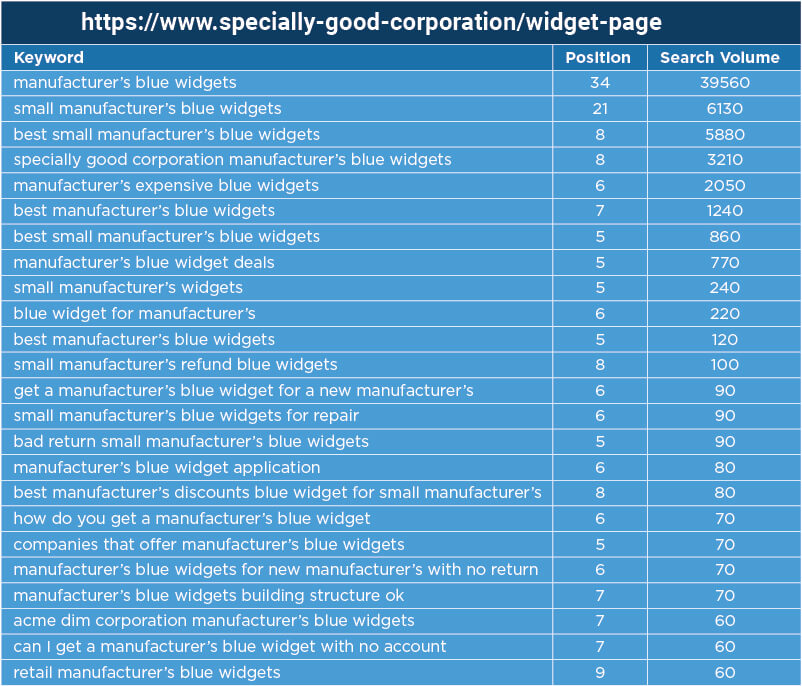
Let’s say you want to rank for “manufacturer’s blue widgets”. The end result should look something like this:

Example Search Query Data for a Site

Now, repeat the process for your competitors ranking for the target phrase “manufacturer’s blue widgets”. When you’re done, it should look something like this:

Search Query Data That Shows That You Have a Long Way to Go

At this point, we have a lot of information which tells us what Google thinks about your site, or not.

Do you show up for a number of related phrases?  If yes, then your target keyword is probably fairly possible for you to rank for, even if you don’t currently show up in the top 50 for that target. If you’re ranking for related words, Google at least sees you as being relevant.

Scenario #1, we need help

But there’s a problem with the data showing above. Notice how the site on the left is ranking only for keywords that include the company’s brand name.

This is not good since we are trying to rank for the phrase “manufacturer’s blue widgets” and that term is nowhere to be found.  This tells us Google doesn’t equate this website with our target phrase.  Ouch!

If you don’t see your target keywords showing in the search results that may be a sign ranking is going to be tough. You either have major content problems related to the target keyword or a general authority problem related to the topic area.

Scenario #2 much better

Let’s take a look at a scenario where our prospects are better:

Search Query Data That Shows That Your Prospects are Good

The data shows we’re in much better shape, and our prospects are reasonably good.

Tuning and tweaking

If you find you rank for a number of related terms, your next steps are pretty straightforward. You should look to improve the content related to the target page on your site by improving the depth of supporting content on other pages of your site.

You may also need to do some public relations (PR) or related link building that supports your stance as a relevant resource.  The scope of this effort is along the lines of tuning and tweaking, not a complete overhaul.

When to do an overhaul

If you didn’t rank for much in the way of related terms, the steps you need to take are basically the same as tuning and tweaking but with more intensity.  You need an overhaul because Google just doesn’t look at your pages as being relevant to the topic/phrase.

This means the program is going to cost significantly more to execute, and it will take longer to show results. If you don’t have the budget or patience for that, you may need to consider a different keyword target.

Some cost perspective

Let’s put this in perspective and see what each scenario may cost you.

In the first scenario where you didn’t rank for any relevant terms, the work involved to rank may cost $250K, and you might have to campaign for ten to twelve months to see the results you’re looking for.

In the second scenario, you rank for relevant terms so your costs to continue ranking or rank ahead might be $50K and might take three to four months to achieve results.

The analysis is actually fairly simple, but the benefits are high. When Google relates keywords to your webpages, your search engine optimization (SEO) costs should be lower.

Focusing on what you already rank for allows you to budget more accurately for your campaigns, and to focus on tactics to help you achieve your goals.

What Keywords Are Ranking For My Site?

Not sure about how to start your SEO campaign because you don’t know what keywords are ranking? Keyword research and analysis is your starting point. We provide in-depth keyword research, analysis, and testing for every SEO campaign. We also offer Keyword Research as a service if you would like to get an excellent idea of where your website is currently situated in the search engine results pages (SERPs), particularly the Google search engine.

Need more information about your website rankings and keywords, contact us to schedule a conversation to discuss your website marketing.

Sunday, September 20, 2020

Google My Business – Do I Need It? By Vancouver WA SEO

We Help Google My Business Boost Your Online Business

Understanding Google My Business

Google My Business Vancouver WA SEOGoogle My Business became an active service in the Google suite of products in June, 2014. At that time, however, it was a very small and not particularly significant factor for online business growth. Since then, Google has increased the importance of GMB, adding features and using it on mobile devices to directly connect searchers with local businesses. This can have a very positive impact for local businesses who use GMB as a positive tool to attract more customers.

Google My Business Is #1 Factor In Local Search Success

We see GMB as an absolutely vital component of any serious local online marketing campaign. We specialize in Google My Business management and marketing. We know how to get the most from Google My Business for your business. Contact us to schedule a conversation about this important marketing program.

This article from Practical Ecommerce has some good information about Google My Business

Google My Business: What You Need to Know

On June 11, Google Places became Google My Business. More than an exercise in rebranding, the name change heralded several important changes.

Google+ integration has been improved. Google My Business (GMB) has been integrated with Google+ Local, the business listing that used to appear for local businesses in Google+. As a result, there’s no longer any confusion between Google Place listings and Google+ All the information is right there in Google+.

In its official announcement, Google said the purpose of GMB is to bring together all the services Google can offer business. Google seems to have its sights set on small businesses, with a particular focus on those that have yet to claim their listings. Google’s promotional headlines — like “Get your business on Google for free’” — are aimed at non-users. However, GMB is also the default dashboard for already-existing Places and Google+ users.

Read more

How Can Google My Business Help You

The following information, from Fix Your Business provides further information about the GMB program.

How Google My Business Works for Your Small Business

Google recently rolled out an upgrade to the Google+ dashboard called Google My Business.  Active Google+ users may have noticed this upgrade in the top right hand corner of their Google+ page next to the +Name and before the notifications bell.  The icon appears as a small set of nine squares and when clicked, gives you an immediate view into popular Google products.  While this icon isn’t new, Google My Business has a few new and noteworthy features.  So, let’s take a look.

UPDATE: Google has turned off Google+ and replaced it with Google My Business

Read more

Strategies To Improve Your GMB Listing

Need more! Here are some tips and strategies from How To Get Online that has some excellent ideas about how to get up and running with Google My Business.

6 Tips for Improving Your Google My Business (GMB) Listing

Learn how to improve your Google My Business listing with helpful tips that will boost your local SEO & grow your business’s visibility on search engines.

Claiming a Google My Business (GMB) listing (also formerly known as Google Places) is the first step for any small business owner looking to perform local SEO. Getting started with GMB is a must for local businesses and something that will increase your chances of being shown on Google’s Local Pack, Local Finder, Google Maps, and even in organic rankings.

Read more

Sources: Google My Business Services

Google My Business is now an important piece of your local online business presence. Google is making this program even more important by using it as a brand and reputation indicator. Contact us at Vancouver WA SEO so we can get your Google My Business account set up properly. We can manage your GMB account, establish a GMB website, and provide your GMB account with and ongoing Visibility Program. This is NOT an SEO campaign – it is more important than rankings. With a strong GMB account, your prospective local customers can find you directly without using the normal search engine rankings!

Saturday, September 19, 2020

Google Mobile Friendly Testing Tool

Google Announces And Goes Live With Mobile-Friendliness & Page Speed Tool

Now It Is Easier For Businesses To Measure Website Compliance

The new Google user friendly tool is now active; announced by Google on June 2, 2016, this new tool measures the Google Mobile Friendly results along with Page Speed for both Mobile and for Desktop versions or websites. For those of us who’ve been in the website marketing and SEO industry prior to Google’s rise to power, this marks a dramatic and welcomed improvement in Google’s relationship with website owners. More about this important topic below.

From Search Engine Land, June 2nd, 2016 . . .

Google announced on the Google Small Business blog that they have released a new landing page to test your website’s mobile-friendliness and page speed for desktop and mobile all in one place. This tool should make it easier for small businesses to test their sites, as opposed to going to the specific mobile-friendly testing tool and/or page speed testing tool.

The new tool, available now, will test this all at the same time. The unique aspects of this tool are:

(1) Get all three scores on one page.

(2) Google will email you a more comprehensive report for you to share with your webmaster team.

(3) Google will now give you a 0 out of a 100 score for how mobile-friendly your website is, as opposed to if it is mobile-friendly or not.

Here is what the scores say:

Mobile-friendliness: This is the quality of the experience customers have when they’re browsing your site on their phones. To be mobile-friendly, your site should have tappable buttons, be easy to navigate from a small screen and have the most important information up front and center.
Mobile speed: This is how long it takes your site to load on mobile devices. If customers are kept waiting for too long, they’ll move on to the next site.
Desktop speed: This is how long it takes your site to load on desktop computers. It’s not just the strength of your customers’ web connection that determines speed, but also the elements of your website.

Why Is The Mobile Friendly Tool Important?


You Now Know For Certain The Good Or Bad News

There is no feeling of ambiguity here! With a ratings scale of 0 to 100 for each of the 3 areas measured, you will know instantly where you need to improve your site. The Google Friendly and Page Speed Tool (GFPS Tool) comes with an optional downloadable PDF report. Be prepared for some heavy duty technical bullet points for each area that needs improvement.

Get Improvement Insights

For website developers, like us, this is the best news possible, because for the first time we can actually get all the important metrics for a website along with recommendations on how to improve a website for Mobile Friendliness plus Mobile Page Speed and Desktop Page Speed. This is a long awaited feature from Google and offers quick methods for boosting a website usability.

We Can Do This For You

If you noticed the last sentence above that ends with “elements of your website”? This refers to your website architecture and some major ‘under the hood’ factors. Areas that are frequently cited as needing improvement are:

  • Javascript
  • CSS
  • Calls to Server

Friday, September 18, 2020

Google My Business Images For SEO Vancouver WA

Google Likes Images!

Using Images To Improve Your GMB Listing

Google likes images and rewards site owners who upload images with data about the purpose of the image, location, and any associated description. We’ve included some images on this page that we uploaded to our Google My Business account. Read on to find out more about Google, GMB, and images.

What is EXIF?

EXIF data (also sometimes referred to as metadata) contains information such as aperture, shutter speed, ISO, focal length, camera model, date the photo was taken and much more. You can also include copyright information in your EXIF data when you register your camera through the manufacturer. For images in JPG format, can add or edit title, latitude and longitude, description, and add key terms.

Google And EXIF Data

Google strips data from images that are downloaded either inside a web page or directly from the Internet browser. However, we do not know if the EXIF data is separated from an image while it is stored in the Google database(s). We do know that by adding images to Google via the Google Application Programmer Interface (API) the EXIF data is not stripped immediately. It appears Google at least records the data in one of its databases. This can be highly beneficial for local Google My Business listings. We do see website listings move up in the Local Listings (rankings) when a number of images are added to a GMB account with correcct EXIF data.

Does Adding EXIF Data Help With SEO Rankings?

Yes, uploading images with proper EXIF data can help boost a website in the local Google Maps listings. By adding EXIF data relevant to the image and your business, Google can help better identify your business and this helps elevate your web presence. The Google company is rather circumspect when it comes to EXIF as an SEO tool, however, we do see good results when we include EXIF data with images.

Who Can Help Me With My GMB Images?

Vancouver WA SEO is highly experienced with Google My Business images. We know how to properly size images, add or keep EXIF data, and upload via the Google Programmer Interface to transfer information to Google. This is an advanced technique and not all SEO agencies can provide this service.